- Jul 9, 2025
Organize your client base
I've always been a pretty organized person, but when it came to managing my client database, I realized there was room for improvement! Over the years, I've tried tons of different "lead organization" methodologies and tools – from simple Google Sheets to complex CRM systems. Through trial and error, I constantly refined this process, adding new fields, changing categories, and testing different approaches. At this point, I've settled on specific tools and created a system that works for my business.
And you know what's the coolest part? At the end of the year, I clearly understand where my clients come from, what types of projects they most often request, and what my deal closure results are.
Unfortunately, I couldn't find a suitable resource many years ago that would work for my goals, but now I want to share my system with you and describe the process of saving and tracking leads that I personally use.
Let's dive in!

First of all, why even record everyone who contacts you?
Well, these are your potential clients, and you can always reach out to them again, maybe you'll get a project – I think that's reason enough. But besides that, of course, it's important to know WHERE they find you and WHY they contact you.
What tool to use
I've tried A LOT of different tools. Special CRM systems (like Bonsai or Dubsado) didn't work for me, as they were often too complex and feature-heavy with paid subscriptions, and since I didn't use most of the functions, I didn't see the point.
Currently, I use a combination of Notion + Google Spreadsheet (both free), and this is more than enough for me and gives me all the flexibility I need.
In Notion, I manage current projects, but that's for another time. Google Spreadsheet serves as my general database of everyone who has ever contacted me (i.e., inbound leads). That's what we'll talk about.
Creating the database
The very first thing you need for your lead database is to know who they are, where they came from, and why. I would consider these essential fields:
First contact date
Status (lead, client, etc)
Company name
Contact person + Email
Lead source
Project type
Additional fields that will help you have more information and form statistics later:
Location
Project notes
Project budget
Result of inquiry
It might also be useful to record personal notes after your initial discussion (what they like, work style, what the project is about, etc.).
How to track lead "status"
So you've created a database and added all the fields you need, what's next? I'd say – record everyone who contacted you for at least the past month, to let's get the process started! But then, to not get lost in your leads, you'll need to understand who among them is in what status at the moment. Are you still discussing the project, or have you already worked together? Is this your previous returning lead or a brand new lead?
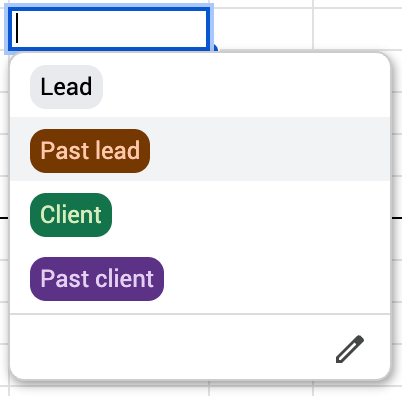
This is where the color coding of statuses or tags that you'll apply to each client helps. I personally use several colors and several tags that help me navigate the database. In reality, it looks something like this:
As for "reminders" to remind the client/lead about yourself, Google even has an article in their blog about how to set this up for the calendar!
Email tracking
Have you ever been curious whether people open your emails? Do they read them? Do they click on the links you mention?
Me too, and only this year I started using one tool that opened my eyes to how people read and return to my emails!
It's a free Streak extension for Chrome browser, and the free version is quite enough for me – it allows me to see from where, when, and from what device my email was opened, whether they clicked on links. This actually gives A LOT of understanding, because if people return to read your email, it means something caught their attention, right?
This is an especially useful tool for cold email outreach that you do, so read below about how to do cold outreach and apply this extension there!

Template for you!
Many-many-maaany trials and errors went into creating a convenient tracking database, but I'm happy to share it with you, and please don't hesitate to adapt it to your needs. Of course, this is a convenient system personally for me and my goals, but perhaps some of you will find it useful too, and I would only be happy about that!
Access the template database here!
If you have other ideas for adapting such a database or you use a completely different tool that covers all your goals, I'd love to hear about it – write about it in our group chat, and let's discuss!
And of course, thank you for reading!